The dye & pattern workshop
Minecraft Banner Generator
Original design studies
One layer stack. Two silhouettes.
These are actual outputs of this editor’s schematic renderer, not promotional game screenshots. The small shield face samples each pattern separately. Try the matching preset in the workbench, move its last layer, and compare the new result.
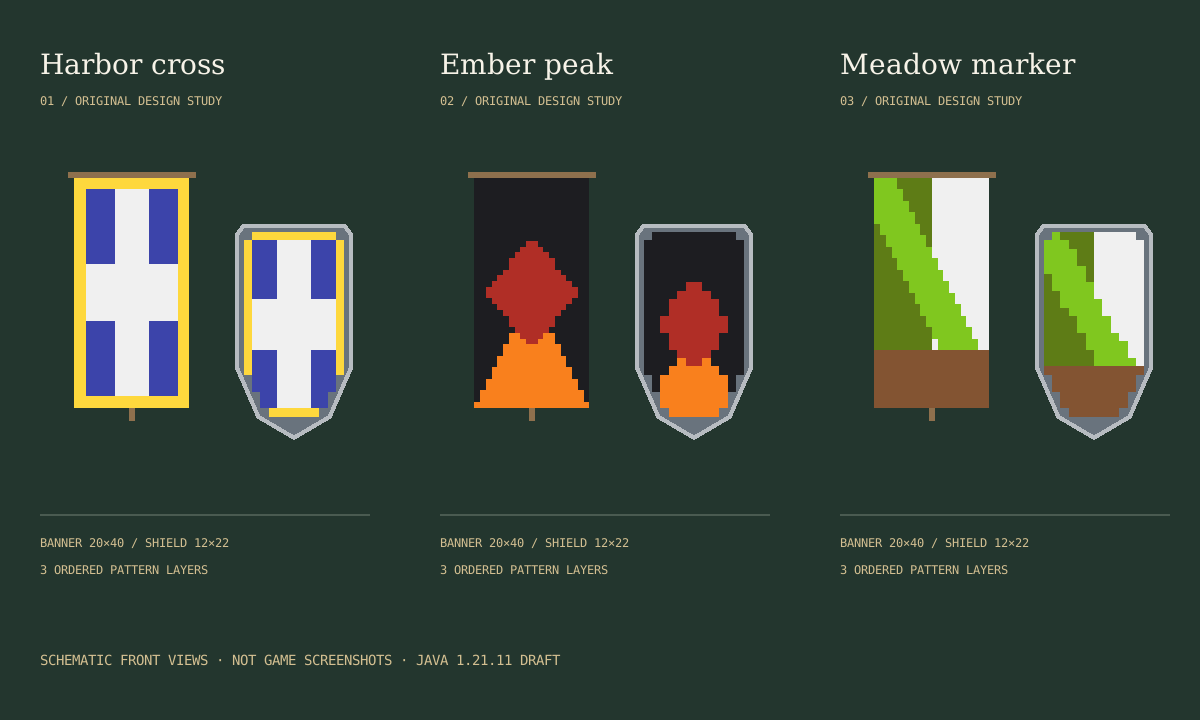
Harbor cross
Blue base → white middle → white center → yellow border.
Download editable example JSONEmber peak
Black base → orange bottom triangle → red diamond → black top stripe.
Download editable example JSONMeadow marker
White base → green left half → lime diagonal → brown bottom stripe.
Download editable example JSONFrom cloth to a reusable design
- 01
Choose the base
Pick one of the 16 named dyes. This sets the banner item’s base color and the shield’s separate base_color component. It is not an extra pattern row.
- 02
Paint in order
Add a pattern and dye, then use the row controls to edit, remove or move it. The last row paints over the others. Repeating a pattern with a new color can fully hide the earlier one.
- 03
Compare both faces
Check the long banner cloth and the smaller, tapered shield. Download either schematic as SVG. Do not mistake this approximation for a resource-pack or in-game appearance guarantee.
- 04
Save before you leave
Export JSON for an editable copy, then import it to restore the exact base, version and stack. Copy the separate banner or shield command draft only for the declared Java profile.
Dye names, not arbitrary HEX
Commands use named dyes. Screen swatches are approximate sRGB colors; lighting, textures and resource packs affect the game’s appearance. This editor does not convert arbitrary RGB colors into new Minecraft dyes.
- White
white - Orange
orange - Magenta
magenta - Light blue
light_blue - Yellow
yellow - Lime
lime - Pink
pink - Gray
gray - Light gray
light_gray - Cyan
cyan - Purple
purple - Blue
blue - Brown
brown - Green
green - Red
red - Black
black
The geometric pattern catalog
The editor currently provides these 21 choices, not the complete vanilla catalog. Each is a local schematic mask. Special emblem designs and custom data-pack IDs are not accepted; fixed-version registry and visual acceptance are still pending.
- Top stripe
stripe_top - Bottom stripe
stripe_bottom - Left stripe
stripe_left - Right stripe
stripe_right - Center stripe
stripe_center - Middle stripe
stripe_middle - Down-right stripe
stripe_downright - Down-left stripe
stripe_downleft - Diagonal cross
cross - Upright cross
straight_cross - Top-left corner
square_top_left - Top-right corner
square_top_right - Bottom-left corner
square_bottom_left - Bottom-right corner
square_bottom_right - Bottom triangle
triangle_bottom - Top triangle
triangle_top - Left half
half_vertical - Top half
half_horizontal - Diamond
rhombus - Roundel
circle - Border
border
Version and command boundaries
The Java 1.20.5 component system distinguishes an ordered minecraft:banner_patterns list from a shield’s minecraft:base_color. A banner instead uses a colored item such as minecraft:blue_banner. The workbench preserves this distinction rather than pasting arbitrary input into a general command field.
Its fixed draft target is Java 1.21.11, not the current release. The generated command, all advertised pattern IDs and both rendered faces still require testing in that actual game version before release. Documentation and syntax tests alone do not establish that a client displays the same design.
Banner design questions
How do I make a banner design?
Choose a base dye, select a pattern and its dye, then add the layer. Edit each row or move it up and down to change the painting order. Later layers cover earlier ones. Export design JSON to keep an editable copy, or download an SVG diagram.
Why does changing the layer order change my banner?
Patterns are painted in list order. If a red stripe is followed by a blue stripe in the same position, the blue stripe covers it. Move the red layer down to paint it last. The command and saved JSON retain this exact order; the base color does not count as a pattern layer.
Does the shield look exactly like the banner?
No. This workbench samples a 20 by 40 banner face and a separate 12 by 22 shield face with a tapered lower edge and metal rim. The original diagrams illustrate the difference; they are not official game textures or a pixel-exact game preview. Real-client comparison for the declared version is still pending.
Which Minecraft version are the commands for?
The current draft profile is explicitly Java Edition 1.21.11. It uses the banner_patterns item component and, for shields, a separate base_color component. It is not a Bedrock command, a legacy NBT command, or a promise of compatibility with newer Java releases. Actual game execution and appearance verification are still pending.
Are all Minecraft patterns supported?
No. This draft editor offers a curated set of 21 geometric patterns. Special emblem patterns, custom data-pack patterns and imported raw commands are outside its scope. The full fixed-version registry and exact mask comparison remain release checks; the catalog below describes only this editor’s current choices.
Can I add more than six layers or craft every design in survival?
This tool stops at six pattern layers as an explicit product limit. It does not claim that six is Minecraft’s command storage or rendering maximum. Current-version loom limits and survival recipes have not been verified here, so the editor does not certify survival craftability.
Can I import somebody else’s banner command?
No. Import accepts only this tool’s versioned design JSON, with known dyes and patterns and up to six layers. Unknown fields, unsupported versions and raw command strings are rejected without replacing the current design. A JSON file can be shared with another user of this editor.
Does saving a design upload it?
No. The workbench processes design JSON and SVG downloads locally in your browser. There is no account, cloud-save service or automatic draft persistence in this tool. Download JSON before closing or reloading the page if you want to keep your changes.
Different jobs, different tools
General command builder
For ordinary give, summon, tellraw and effect commands. Banner layer editing belongs in this workbench.
Block color transitions
Plan a transition between building blocks. Banner dyes are a different palette and do not use block IDs.
All building tools
Find geometry planners, image conversion and other distinct building workflows.
Independent fan-made design tool. Not an official Minecraft product, and not approved by or associated with Mojang or Microsoft. Diagrams are original vector artwork, not redistributed game textures.