A workshop for solid letters
Minecraft Logo Generator
The solid-letter studio
REAL VERTICES / TRANSPARENT OUTPUT1–18 characters: A–Z, numbers, spaces, - . ! Lowercase is rendered as uppercase. Unsupported characters show an error, not a substitute glyph.
Procedural color shading only. No copied stone texture or official logo material.
Live 3D projection
A solid mesh is rotated, lit and rasterized with a depth buffer. Hidden surfaces stay behind nearer surfaces. The preview is 640 × 320; export renders again at your chosen size.
These backgrounds are preview-only. The PNG always has a transparent background; a checkerboard is never baked into the file.
At a straight-on view, real side geometry can be hidden. Turn either view control to reveal it. Depth is measured in glyph-cell units, not a shadow offset.
Export a transparent image
OBJ contains unrotated model-space vertices, normals and faces. It does not embed the preview’s camera, colors or lighting; use design JSON for those settings.
Keep the editable parameters
Design JSON and the share link preserve the text, glyph version, geometry, colors, camera, light and output dimensions. Processing happens locally; no font, texture, design or image is uploaded.
Paste design JSON · maximum 8 KB
Original voxel glyphs. No Minecraft font or texture is loaded.
Geometry, not a shadow trick
Thickness you can turn around
Both images below come from this tool’s own renderer. The word and colors stay the same; the extrusion depth changes from 0.5 to 7 cell units. Front and back vertices move apart, exposed side faces grow, and the camera projects the resulting solid—not a stack of shifted text images.

Make a logo in four deliberate steps
- 01
Write a short name
Use the original uppercase glyph set for 1–18 characters. Letters, numbers, spaces, hyphens, periods and exclamation marks are supported. This is a single-line logo, not a general typography editor.
- 02
Give it solid depth
Set extrusion in cell units. Every occupied glyph cell gets a front and back face; adjacent cells share an interior boundary without redundant side walls. Download OBJ if you need to inspect the actual mesh.
- 03
Turn and light it
Adjust horizontal and vertical view to reveal the sides. Set light azimuth and elevation, then choose front and side colors. Grain varies cell colors deterministically; it is not a texture pack.
- 04
Export without a background
Compare the same transparent render over checker, white and dark backgrounds. Choose a PNG size and download. Save design JSON separately if you want to restore the exact geometry and lighting later.
Transparency belongs to the file
The PNG is a rectangular RGBA image with zero-alpha pixels outside the rendered geometry, including visible holes between strokes. Preview backgrounds are CSS outside the canvas. Changing the background control cannot add a checkerboard or a white rectangle to your export.
The example below composites one decoded transparent PNG over two independent backgrounds. It is not two separately colored logos. Download the original image to try it in your own layout; dark side colors naturally have less contrast on dark surfaces.
Download the transparent example PNG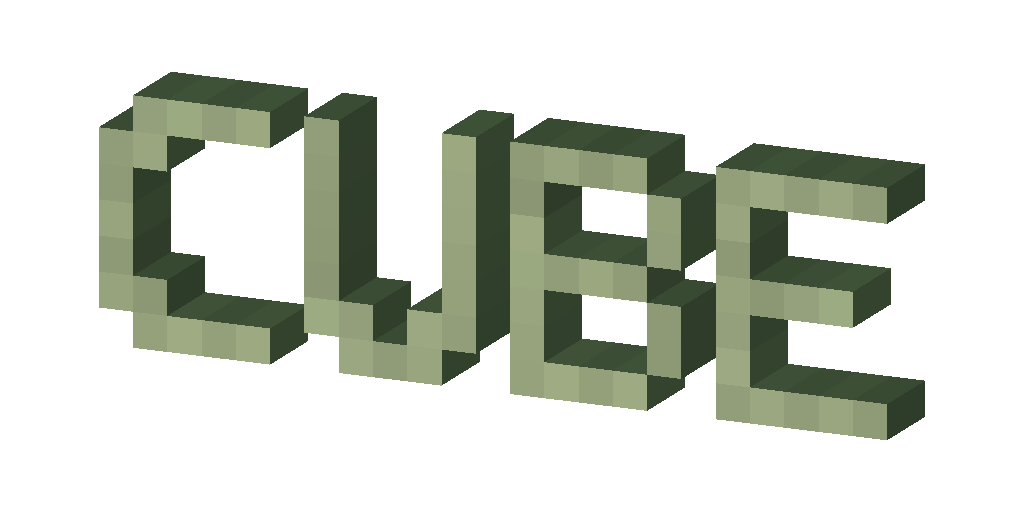

An original, limited visual language
The letterforms are an original 5 × 7 bitmap alphabet authored for this tool. Each lit pixel in that alphabet becomes solid geometry. The tool neither imports the site’s existing Minecraft-style font nor downloads game textures. Its material choices are flat color or deterministic per-cell grain, with ambient and directional shading.
The renderer uses an orthographic camera, triangle rasterization and a per-pixel depth buffer. It does not provide perspective, bevels, cast shadows, font uploads, multiline layouts, texture mapping or a physical material simulation. “3D” describes the underlying vertices and faces, not a promise to recreate an official brand treatment.
Logo creation questions
Is this real 3D lettering or a drop-shadow effect?
It is real solid geometry. Every occupied cell in an original 5 by 7 glyph is extruded into a prism. The mesh has front, back and exposed side faces with 3D coordinates and normals. A rotated orthographic camera projects triangles into a depth buffer; nearer faces hide farther faces. You can download the actual unrotated geometry as OBJ.
Which characters can I use?
Use 1–18 characters: A–Z, 0–9, spaces, hyphens, periods and exclamation marks. Lowercase is rendered as uppercase. Unsupported characters and empty text produce an error rather than being silently replaced. This original limited glyph set is for short image logos, not multilingual formatted chat text.
Does the PNG really have a transparent background?
Yes. The renderer starts with zero-alpha pixels and paints only the logo geometry. Checker, light and dark backgrounds are preview controls outside the image data. PNG export renders again at the selected size: 512 by 256, 1024 by 512 or 1600 by 800 pixels.
What changes when I adjust depth, view and light?
Depth changes the actual distance between front and back vertices. Horizontal and vertical view rotate the geometry before projection. Light controls change the directional-light vector used with each face normal; they do not move the geometry. A straight-on camera can hide side surfaces even though those surfaces exist.
Does this use the official Minecraft font or logo?
No. It uses original 5 by 7 bitmap letterforms and procedural color shading created for this tool. No Minecraft font, texture or official logo artwork is loaded. This is an independent fan-made voxel design tool, not an official product or a promise of matching the Minecraft trademark.
What is saved in JSON and what is in the OBJ file?
Design JSON preserves the text, glyph version, depth, colors, material, camera angles, light direction and PNG dimensions. Import or a fragment share link restores those parameters. OBJ contains model-space vertices, normals and faces only; it does not bake in camera, lighting, color materials or a texture map.
How is this different from the font generator?
The font generator owns formatted text, color codes and text-copy workflows. This page creates a transparent image and real extruded mesh for a short decorative logo. It does not output chat formatting, MiniMessage, title commands or a replacement Minecraft font file.
Why are some sides dark or the edges hard?
Face colors are shaded by directional light plus a fixed ambient term. Turn the light or view to reveal a dark side, or choose a lighter side color. The CPU renderer uses hard-edged voxel sampling without anti-aliasing, perspective, bevels, cast shadows or physically based materials. Grain is deterministic per-cell color variation, not a downloaded texture.
Do I need an account, WebGL or a cloud render?
No. Geometry and rendering run locally in the browser using a CPU rasterizer and a 2D canvas. PNG generation does not depend on WebGL, a remote font or a texture service. There is no automatic cloud save or draft persistence; export design JSON before leaving the page.
An image logo is not formatted text
Need color codes or formatted text?
Use the existing font generator for text styles and copy formats. This logo studio does not replace that workflow or output chat commands.
Looking for a building planner?
Browse the building tools for circles, layers, blocks and other tasks. This mesh is decorative logo geometry, not a Minecraft world schematic.
Independent fan-made tool. Not an official Minecraft product and not approved by or associated with Mojang or Microsoft. It does not use or reproduce the official Minecraft logo, font file or textures.