COMMAND DESK / HORIZONTAL CYLINDERS
Open command workbenchLearn how to make a circle using worldedit
01 / WorldEdit cylinder workbench
Prepare an operation, then review its placement.
Preparing geometry
Placement command
//pos1 0,64,0Run //pos1 first. Use //toggleplace only as needed until its feedback confirms position 1; it toggles state, so never repeat it blindly. Then run the cylinder command.
WorldEdit command
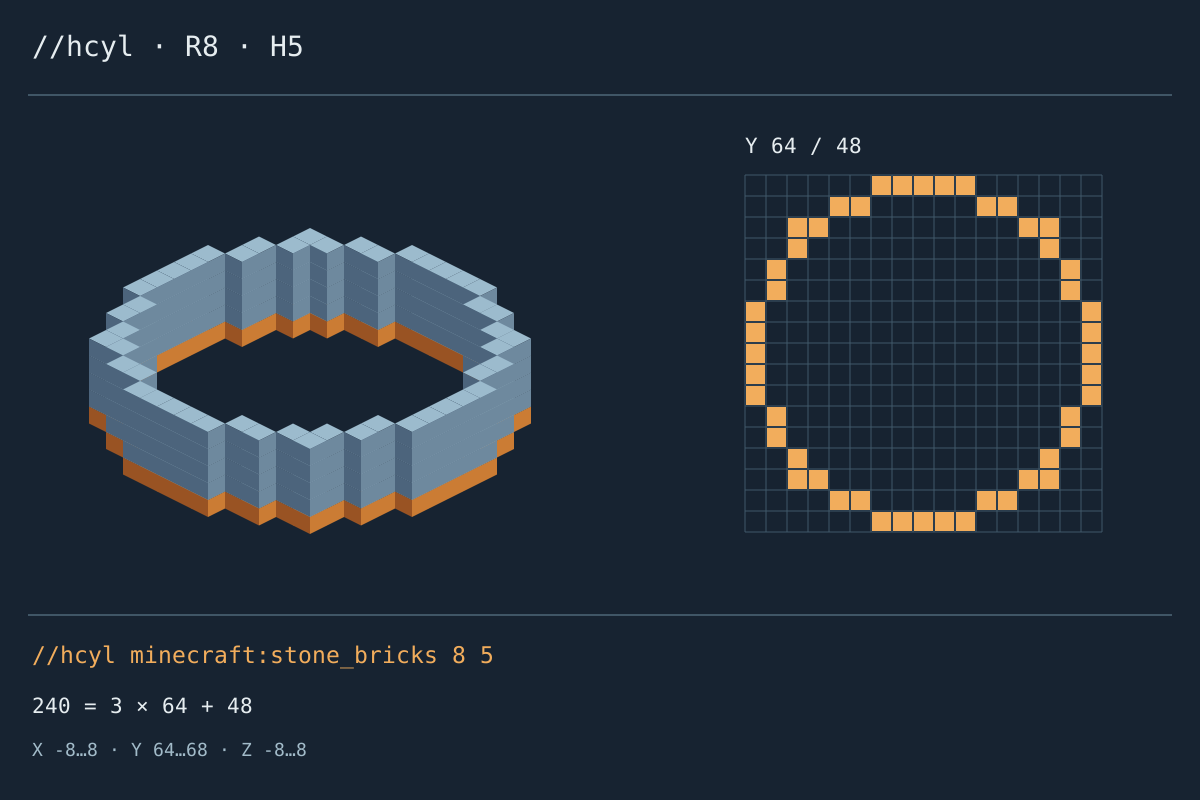
//hcyl minecraft:stone_bricks 8 5WorldEdit text only; not a vanilla mcfunction.
Placement preview
Select a placed cell to inspect its world position.
Selected cell · World coordinates: 0, 64, 0 · Empty cell
- Planned placements
- 240
- Placements per course
- 48
- Stacks of 64
- 3
- Extra blocks
- 48
Occupied bounds: X -8…8 / Y 64…68 / Z -8…8 · Occupied diameter: 17 × 17
Row runs · Y 64
| Z | X → X | Σ |
|---|---|---|
| -8 | -2 → 2 | 5 |
| -7 | -4 → -3 | 2 |
| -7 | 3 → 4 | 2 |
| -6 | -6 → -5 | 2 |
| -6 | 5 → 6 | 2 |
| -5 | -6 → -6 | 1 |
| -5 | 6 → 6 | 1 |
| -4 | -7 → -7 | 1 |
| -4 | 7 → 7 | 1 |
| -3 | -7 → -7 | 1 |
| -3 | 7 → 7 | 1 |
| -2 | -8 → -8 | 1 |
| -2 | 8 → 8 | 1 |
| -1 | -8 → -8 | 1 |
| -1 | 8 → 8 | 1 |
| 0 | -8 → -8 | 1 |
| 0 | 8 → 8 | 1 |
| 1 | -8 → -8 | 1 |
| 1 | 8 → 8 | 1 |
| 2 | -8 → -8 | 1 |
| 2 | 8 → 8 | 1 |
| 3 | -7 → -7 | 1 |
| 3 | 7 → 7 | 1 |
| 4 | -7 → -7 | 1 |
| 4 | 7 → 7 | 1 |
| 5 | -6 → -6 | 1 |
| 5 | 6 → 6 | 1 |
| 6 | -6 → -5 | 2 |
| 6 | 5 → 6 | 2 |
| 7 | -4 → -3 | 2 |
| 7 | 3 → 4 | 2 |
| 8 | -2 → 2 | 5 |
JSON and CSV describe all placements; SVG shows one course.
Requires WorldEdit and permission. Review in a backed-up world; this page never runs commands.
WorldEdit commands · editable radii · no server connection
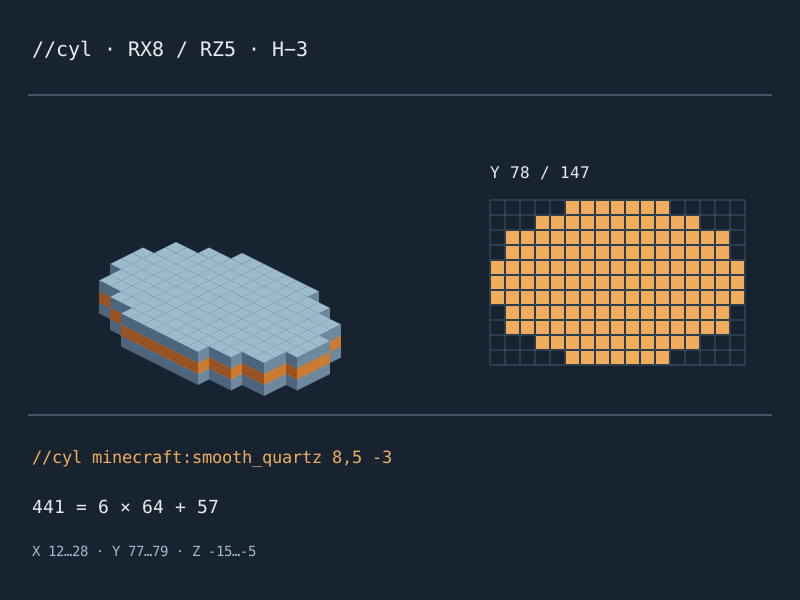
The illustrations are generated from this tool’s cylinder placements.
Open command workbenchPrepare before pasting
Four checks before running the command
Work in a backup or disposable test area first.
Select the operation
Choose circle or ellipse, then filled or hollow. Height one makes a horizontal disc or ring; taller values repeat the footprint.
Set arguments deliberately
Set radii, height, direction and material. Circle mode uses equal radii; ellipse mode keeps X and Z independent.
Inspect placement
Apply settings, then inspect layers, bounds and cells. The origin is the generation centre, not a selection corner.
Copy, then verify in game
Copy the command or annotated text. Check generation position, permissions and version in game before execution.
Arguments with visible consequences
Read the command through its footprint
Native cylinder syntax
For builders asking how to make circle with worldedit, the result is a native cylinder operation, not vanilla setblock lines. Filled and hollow select different commands.
Two independent horizontal radii
Ellipse radii control X and Z independently, in that order. The occupied span is shown separately: radius is not an exact requested block diameter.
Signed height, visible layers
Upward height starts at your reference Y. Downward height excludes it: three courses from Y 64 occupy Y 61–63. Direction changes placement, not the footprint or total.
Files that remain inspectable
JSON and CSV carry the entire set of world placements. SVG captures only the selected horizontal layer. The text download contains WorldEdit instructions; it is not a vanilla function file.
Placement decisions
Three easy mistakes to avoid
A centre block changes width
WorldEdit adds half a block before sampling. Radius 7.5 stays 7.5 in the command and spans seventeen positions, not fifteen. Decimal radii are supported; the origin and height remain integers.
Hollow does not mean an empty operation
Hollow emits perimeter positions only. Existing interior blocks remain untouched. The preview counts planned placements, not actual changes to your world.
Generation position is a session setting
WorldEdit uses the player or selection position as its generation centre. Match that session setting to the entered origin; this website does not move either.
Choose by execution environment
Not a vanilla command wrapper
Match the output to your installation.
Grid calculator
WorldEdit-specific arguments and sampling.
Prefer a grid calculator for exact-width manual foundations.
Vanilla commands
For permitted WorldEdit installations.
Vanilla syntax and execution requirements differ.
Schematic workflow
No structure import required.
Schematics need a compatible importer and separate placement.
A checkable geometric contract
What the WorldEdit model means
WorldEdit documents cylinders by block pattern, radius and height, with two radii for ellipses. This planner follows that specific geometry, not an interchangeable circle outline.
Radius five gives 97 filled or 28 hollow positions per course. Height three gives 291 or 84 placements. These are reproducible model examples, not a report of an in-game server test.
WorldEdit / GenerationBefore using WorldEdit in a live world
Do I need WorldEdit installed?
Yes. These commands require compatible WorldEdit and permission. The page cannot install extensions or grant access.
Does selecting hollow remove the middle?
No. Interior positions are omitted, not cleared. Remove existing terrain separately only when you intend to change it.
Why does the command ignore my coordinate fields?
Cylinder commands use WorldEdit’s generation position, not trailing coordinates. Set position one and confirm generation mode in game.
Can I make a vertical wall circle?
Not here. The footprint lies in X Z and height follows Y. Rotation and vertical discs are unsupported.
Is the material count guaranteed on my server?
No. Existing blocks, masks, boundaries and permissions affect real edits. Undo also depends on your WorldEdit session.
Read the arguments once more
Learn how to make a circle using worldedit safely: confirm the centre, try a small edit and keep a backup.
Open command workbenchIndependent tool; not affiliated with WorldEdit, EngineHub, Mojang or Microsoft. No server execution or in-game verification is provided.
WorldEdit · EditSession.makeCylinder · 6e148b7