STRUCTURE FILE LAB / JAVA EDITION
Prepare a schematicBuild a minecraft circle schematic to import
01 / minecraft circle schematic workbench
Inspect the cells that will be written to the file.
Encoding the structure
File format
Sponge v2 · .schem
File name: minecraft-circle-circle-17x5x17-hollow-t2-stone_bricks-center-x0-y0-z0.schem
These steps use the suggested filename. If your browser adds a suffix or you rename the file, use its final name in //schem load.
Sponge v2 · Java 1.20.4 · DataVersion 3700. Requires a compatible importer.
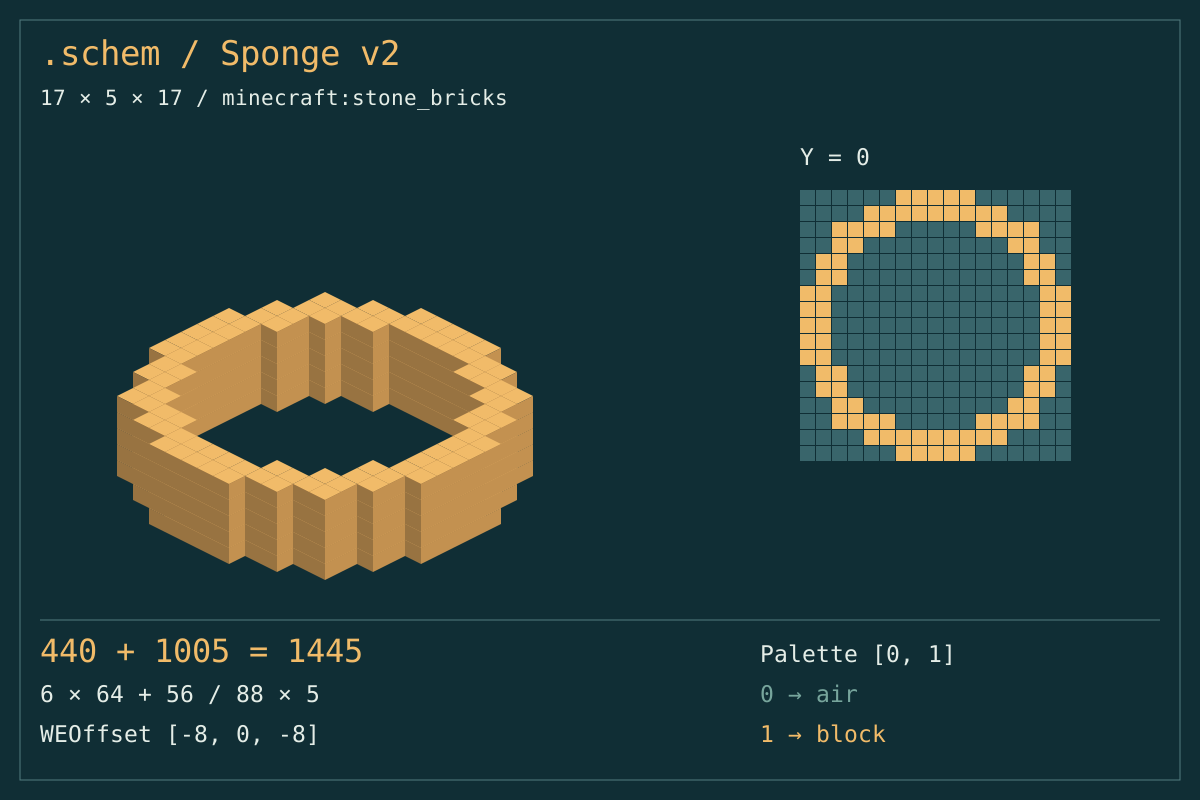
- Dimensions
- 17 × 5 × 17
- Stored volume
- 1,445
- Stored air
- 1,005
- Palette entries
- 2
Placement offset: -8, 0, -8
Structure preview
Select a cell to inspect its local position and stored material.
Local coordinates: 8, 0, 8 · Relative placement: 0 0 0 · Air cell
- Occupied blocks
- 440
- Blocks in layer
- 88
- Full stacks of 64
- 6
- Loose blocks
- 56
Occupied row spans · Y 0
| Z | X → X | Σ |
|---|---|---|
| 0 | 6 → 10 | 5 |
| 1 | 4 → 12 | 9 |
| 2 | 2 → 5 | 4 |
| 2 | 11 → 14 | 4 |
| 3 | 2 → 3 | 2 |
| 3 | 13 → 14 | 2 |
| 4 | 1 → 2 | 2 |
| 4 | 14 → 15 | 2 |
| 5 | 1 → 2 | 2 |
| 5 | 14 → 15 | 2 |
| 6 | 0 → 1 | 2 |
| 6 | 15 → 16 | 2 |
| 7 | 0 → 1 | 2 |
| 7 | 15 → 16 | 2 |
| 8 | 0 → 1 | 2 |
| 8 | 15 → 16 | 2 |
| 9 | 0 → 1 | 2 |
| 9 | 15 → 16 | 2 |
| 10 | 0 → 1 | 2 |
| 10 | 15 → 16 | 2 |
| 11 | 1 → 2 | 2 |
| 11 | 14 → 15 | 2 |
| 12 | 1 → 2 | 2 |
| 12 | 14 → 15 | 2 |
| 13 | 2 → 3 | 2 |
| 13 | 13 → 14 | 2 |
| 14 | 2 → 5 | 4 |
| 14 | 11 → 14 | 4 |
| 15 | 4 → 12 | 9 |
| 16 | 6 → 10 | 5 |
The schematic includes air. Use skip-air in your importer when preserving existing blocks.
WorldEdit import steps
//schem load minecraft-circle-circle-17x5x17-hollow-t2-stone_bricks-center-x0-y0-z0
//paste -n
//paste -a
No world connection. Back up before pasting.
Binary structure export · editable geometry · local processing
These views come from the same occupied cells used by the exporter.
Prepare a schematicFrom dimensions to a portable file
Four steps to prepare your structure
Test a small shape in a disposable world.
Choose the footprint
Set a circular diameter or independent ellipse widths.
Check the empty cells
Inspect a layer and the volume.
Choose the reference
Select corner or centre, then offsets.
Download and test
Load the schematic with a compatible importer. Preview the bounds, try an air-skipping paste and confirm the result.
A structure, not a picture
What your minecraft circle schematic contains
A genuine binary download
This minecraft circle schematic generator writes gzip-compressed Sponge v2 NBT. Dimensions, palette and block data travel together, rather than a renamed image or command.
Geometry you can inspect
Compare a thin ring with a broader wall, or fill the centre. Width and depth describe the file envelope; height repeats the footprint.
A deliberate placement reference
Align a corner or use the lower central cell. Even widths have their mathematical centre between blocks: the chosen reference stays on an integer cell.
Companion inspection files
Save CSV coordinates or a JSON manifest alongside the .schem file. These readable records help review the design; they are not substitutes for binary structure data.
Small details that change a paste
Three file details worth understanding
Air is still represented
The outline’s centre is stored as air. A normal paste may erase existing blocks there. WorldEdit’s //paste -a skips air; test it before using a valuable destination.
Thickness grows inward
A thicker outline reduces the opening. Extruded height creates neither a separate floor nor a roof. Every layer repeats the same occupied cells.
Versions are explicit
The file uses Sponge v2 and Java 1.20.4 block data, DataVersion 3700. Your importer decides compatibility. This page does not inspect a server or test a real import.
Pick the output your workflow needs
File delivery instead of command delivery
Similar-looking circles can require very different handoffs.
Manual block grid
Retain dimensions and block identities in a portable structure.
Use a grid when you want to place every block yourself.
WorldEdit command
Carry the exact generated cells in a file.
Use the command planner when native cylinder arguments are the desired output.
Litematica project
Download the stated schematic format only.
A .litematic file is a different format; no extension rename converts it.
Inspect the export contract
Read your minecraft circle schematic before import
Width × depth × height equals occupied blocks plus stored air. Palette entry zero represents air, and material entries identify placed blocks. This distinguishes the storage envelope from inventory requirements.
Block indices advance through X, then Z, then Y. The preview and exporter share one plan. File and geometry checks are not evidence of an in-game import.
Sponge / Schematic v2Need a different delivery format?
Keep the workflow matched to your building task.
Questions before loading the file
Is this a minecraft circle schematic or a screenshot?
The main download is a binary .schem structure. Images only illustrate the same generated cells; they cannot be loaded as structures.
Will an outline erase the middle?
It can when an importer pastes air. Use skip-air and verify the destination bounds in a safe test area.
Can I rename it to .litematic?
No. That format has a different internal layout. Renaming an extension does not convert the encoded structure.
Does the material count include empty space?
No. Air is counted separately. Neither total measures how many existing world blocks will actually change.
How does the centred offset work?
The file subtracts floor((width-1)/2) and floor((depth-1)/2) from your X and Z offsets. Y keeps your offset. This reference is relative to the paste position.
Keep the file and placement in agreement
Generate your minecraft circle schematic, inspect its empty space and test one careful import before building at scale.
Prepare a schematicIndependent project; not affiliated with Mojang, Microsoft, Sponge, WorldEdit or Litematica. Compatibility and permissions remain your responsibility.
WorldEdit / Clipboard