FLOOR PATHS / RISING SLAB ROUTES
Open the spiral workbenchBuild with the spiral minecraft generator
01 / spiral minecraft generator
Choose a model, edit settings, then apply.
Loading plan
Placement preview
All-layer projection hides lower blocks at shared positions.
Select a cell or advance along the path.
Tab enters the preview once. Arrow keys inspect occupied blocks by X/Z; Home/End select the first/last visible block. Enter or Space selects the focused block. Tab leaves the preview.
Selected position
X 5 · Y 64 · Z 0
Block half: Bottom · Tread surface: 64.5
Unique placements
81
Stacks of 64
1
Loose items
17
Ordered steps
81
Clearance
4
Geometry only; no in-game traversal test.
Placement rows · Y 64
| Z | X | Unique placements | Block half |
|---|---|---|---|
| 0 | 5 … 5 | 1 | Bottom |
| 1 | 5 … 5 | 1 | Bottom |
| 2 | 4 … 5 | 2 | Bottom |
| 3 | 4 … 4 | 1 | Top |
| 4 | 2 … 4 | 3 | Top |
JSON includes both coordinate sets; CSV/function follow coordinate mode. SVG shows the selected layer or top projection.
Functions replace existing blocks. Back up your world; relative commands need one fixed execution origin.
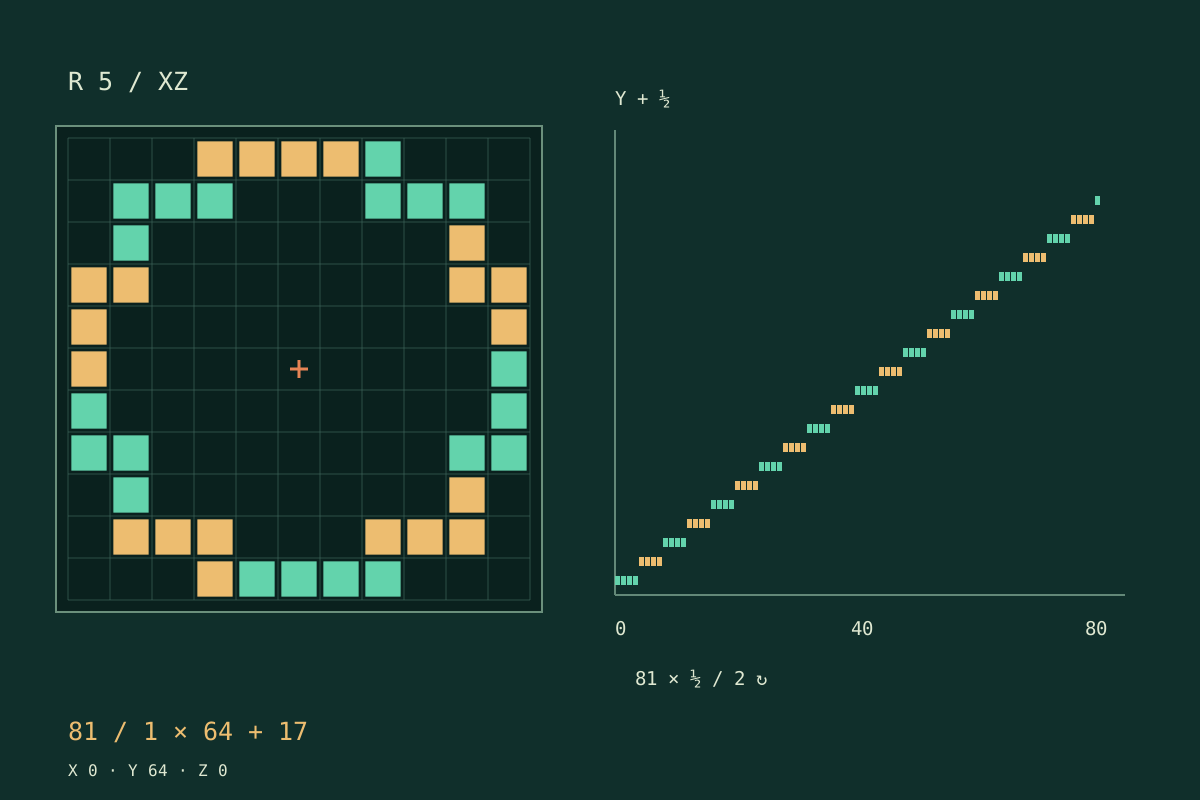
Flat paving · half-block ascent
Both images are generated from actual spiral placements.
Open the spiral workbenchTrace the route
Four steps with the spiral minecraft generator
Keep the entrance, winding and coordinate reference consistent.
Choose the geometry
Select a flat spiral for paving or a slab staircase for height.
Anchor the entrance
Pick a starting compass side and winding direction.
Read one slice
Move through occupied heights and inspect the selected cell.
Check and carry
Review connectivity, conflicts and clearance before exporting.
Geometry that changes with the job
A minecraft spiral staircase generator with explicit slab states
A path with connected neighbours
The flat centreline crosses shared block edges instead of relying on isolated rounded samples. Its radius increases with each turn. Wider paving uses a discrete brush, so inspect tight sections where neighbouring passes may touch.
Slabs with explicit halves
Rising treads follow a closed digital ring. Height advances in half-block units, and every placement records whether its slab belongs to the upper or lower half. There are no hidden stair orientations to guess.
Clearance you can examine
The audit checks stacked columns and transitions between neighbouring columns against a two-block allowance. It is a conservative geometric check, not Minecraft movement simulation. Nearby terrain, ceilings and added decoration remain your responsibility.
Exports from one model
The preview, materials and coordinate files describe the same unique placements.
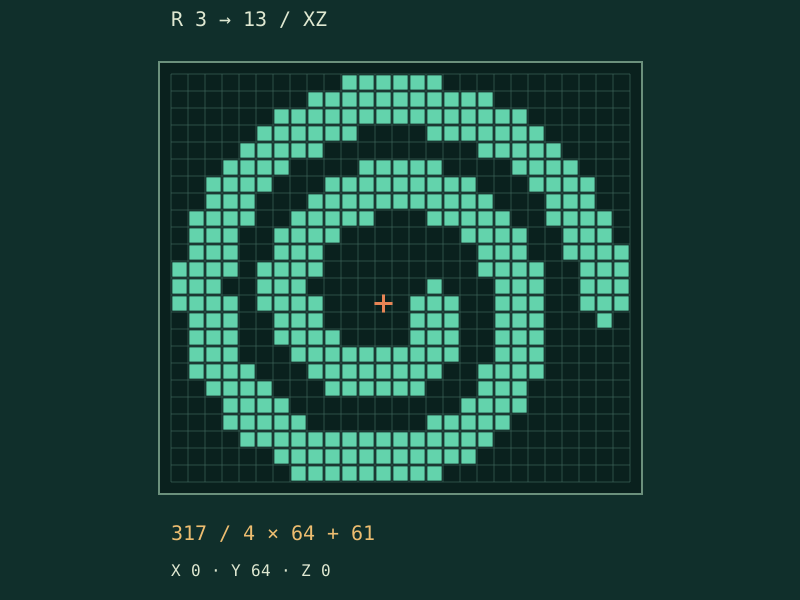
Before adding the tower
Three decisions an overhead picture cannot settle
Pitch is not an empty corridor
For a spiral circle minecraft floor pattern, pitch measures radial growth, not a guaranteed empty gap.
Rise and turn count do different jobs
Rise sets vertical gain for one complete circuit; turns repeat that circuit. Increasing radius adds horizontal treads per revolution. These choices change the climb distribution, not just the size of a picture.
A useful stair still needs a setting
This model supplies a narrow slab route, not a finished tower. Add supports, railings, an entrance and an exit yourself. Keep those additions outside the inspected head space and try the result in a disposable world.
Choose by construction task
A spiral is not a circle with a new title
Choose a planner by what changes along its path.
Circle calculator
Changing radius or elevation
Closed footprint at one height
Static image
Inspectable coordinates and states
Only a visual reference
World editor
Download and inspect separately
No direct game connection
Inspect the generated placements
Reproduce the spiral minecraft generator checks
The staircase ring contains eight times the radius in horizontal steps per revolution. At radius five that is forty moves. The final return tread is included, so two revolutions have eighty-one ordered tread positions, not eighty.
These are properties of this algorithm, not official Minecraft standards. Materials count occupied coordinates after deduplication. Top and bottom slab states are preserved in the manifest, and the safety report explicitly records that in-game traversal has not been verified.
Continue with another geometry
Switch tools when the footprint, opening or building task changes.
Questions about the spiral minecraft generator
Why does a top view hide part of the staircase?
Several heights can share X and Z. A projection overlays them, whereas a selected layer shows only its own placements.
Can I make the staircase wider?
Not in this model. The slab route is one block wide.
Does a passing check guarantee a safe climb?
No. It verifies defined geometry only.
Will the function erase existing blocks?
Its setblock commands replace blocks at the listed positions when you execute it. Downloading does nothing to your world.
Why is the final tread included?
It closes the requested number of revolutions at the target elevation. Omitting it would leave the ordered route one horizontal move short.
Trace the entrance before building the tower
Use the spiral minecraft generator to settle the shape, check the layers and export a plan you can inspect. Start with a small test, then build the surroundings.
Open the spiral workbenchIndependent tool, not an official Minecraft product; no affiliation with Mojang or Microsoft.